

Check your Mac's folder structure
セクションアウトライン
-
-
Displaying the hard disk (Macintosh HD) icon
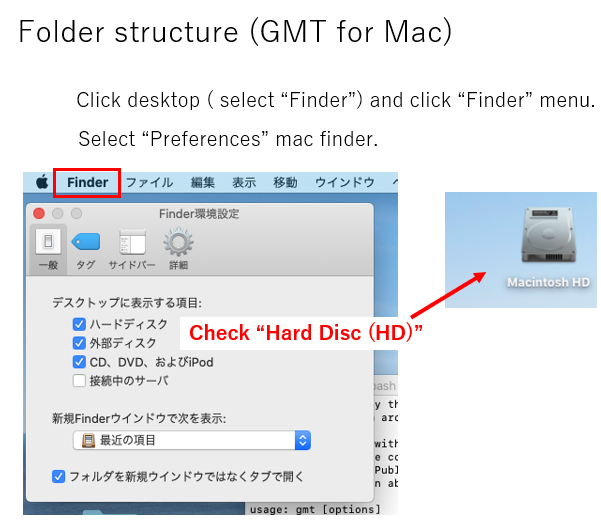
On the latest Macs, the hard disk (Macintosh HD) icon is not displayed on the desktop screen by default.
Click on the desktop screen to display the Finder menu at the top of the screen. Click "Finder" in the menu to enter the Finder Preferences screen. Therefore, set the hard disk to be displayed on the desktop.
Macintosh HD folder structure
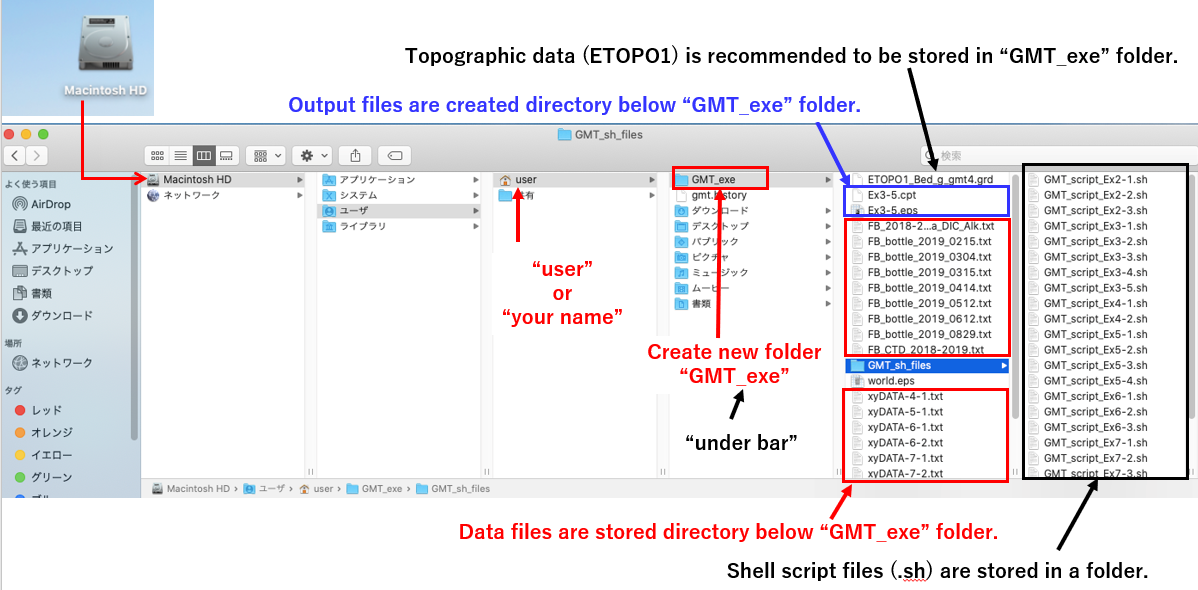
Click the Macintosh HD icon to display the folder structure within the HD. Please create a GMT work folder "GMT_exe" directly under user (administrator's name) as shown below. (" _ " is an underscore)
Please store the data file to be read by GMT directly under this working folder (GMT_exe).
It is a good idea to create a folder with an arbitrary name such as "GMT-script-files" in your work folder (GMT_exe) and store the GMT command statement files (shell script files: .sh files) there.
The topographic map data file (ETOPO1) can be saved anywhere, but it is recommended to store it in the GMT_exe folder so that it does not go missing.
-