

GMT operation check (map creation)
セクションアウトライン
-
-
You installed GMT-5.4.5 and the text editing software (Mi), created a working folder (GMT_exe), and saved the topographic map data (etopo1) in GMT_exe, right?
* ETOPO1_Bed_g_gmt4.grd (933.5 MB): Please check the file name, file size, and save location.
Start Mi, create a new file, and save it with a different name (test.sh). Please also type in the extension “.sh” to indicate that it is a shell script file. Let's save it to /Users/user/GMT_exe/GMT_shell/.
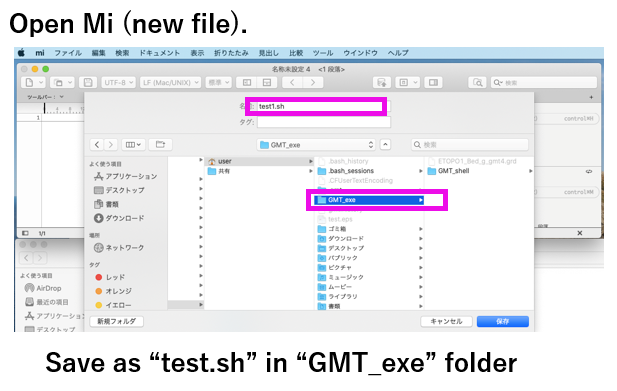
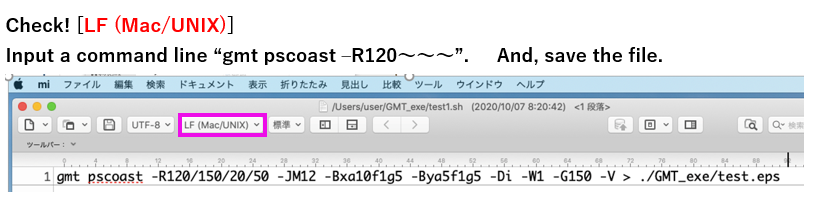
Select "LF (Mac/UNIX)" from the tab at the top of the Mi screen.
(Mac/UNIX should be selected in Mi's initial settings)Type the following in the first line of the test.sh file opened on Mi and save it.
(Just copy and paste the text)gmt pscoast -R120/150/20/50 -JM12 -Bxa10f1g5 -Bya5f1g5 -Di -W1 -G150 -V > ./GMT_exe/test.eps
-
-
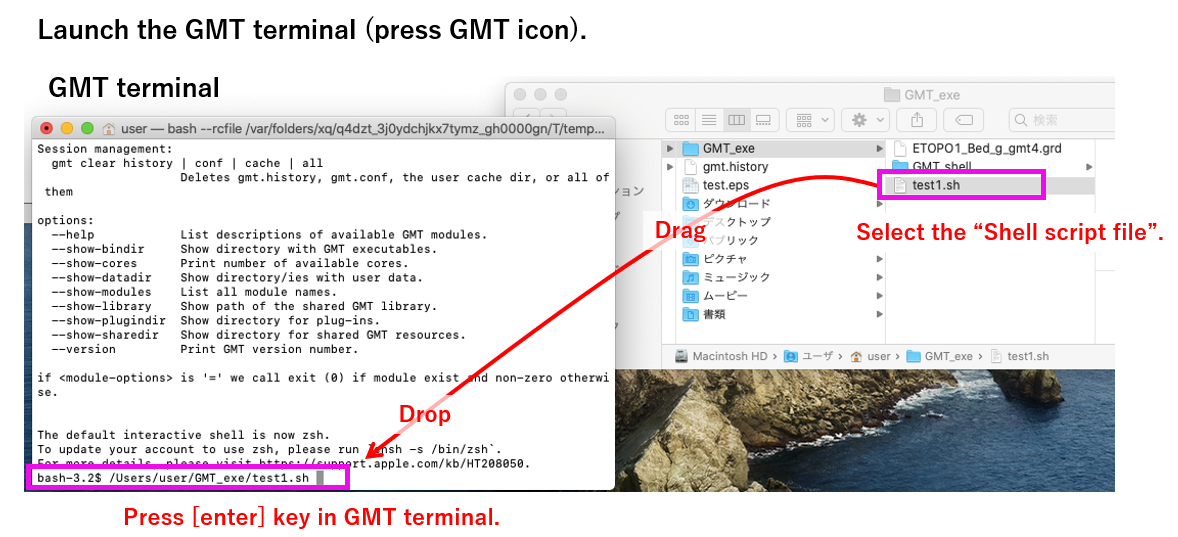
- Start GMT from the launcher (application).
・From the finder, select the test.sh file saved in /Users/user/GMT_exe/GMT_shell/ (one click, do not double click)
- Drag the test.sh file (grab and move it) and drop it on the GMT terminal screen. (This is called Drag & Drop)
- The path of test.sh will be displayed on the GMT terminal. Press the [enter] key in the terminal.
-